Your Grove
A record of how you use Leaftext, kept on your own disk and turned off with one switch.
Leaftext keeps a quiet record of what you do in it and shows it as your Grove: thirteen Growth areas, each leveled by its own kind of use, and one Grove level that everything you do fills. XP is earned as you go, each area levels on its own the moment its bar fills, and every point also goes into the Grove's own bar. The Grove level is the one thing you take: when its bar is full, the whole bar becomes a press you hold to grow to the next level, and that level is what hands you seeds. Nothing about any of it changes how a document reads, and nothing it counts leaves your computer.
Open your Grove
The Grove pill sits at the bottom of the library pane, under the row of buttons for Scheduled tasks, Favorites, Recent and Search. It runs the width of that row, and never narrower than four of those buttons' worth, so its words read whole even on a fresh copy with nothing in Favorites or Recent; it shows the Leaftext leaf and your Grove level — or Grove 2 full when its bar is full and the next level is ready to take, with the pill in the theme's accent. Press it and a large sheet rises from the bottom of the window with your Grove level and its bar — the XP it holds toward the next Grove level, or At its ceiling once every area has grown as far as it goes — then a year of days — one square a day on your own computer's calendar, darker the more grew on it — and every Growth area, its level and a bar for how far into that level it has grown. Drag the sheet down, press the cross, press outside it or press Escape to put it away. The document stays open underneath.
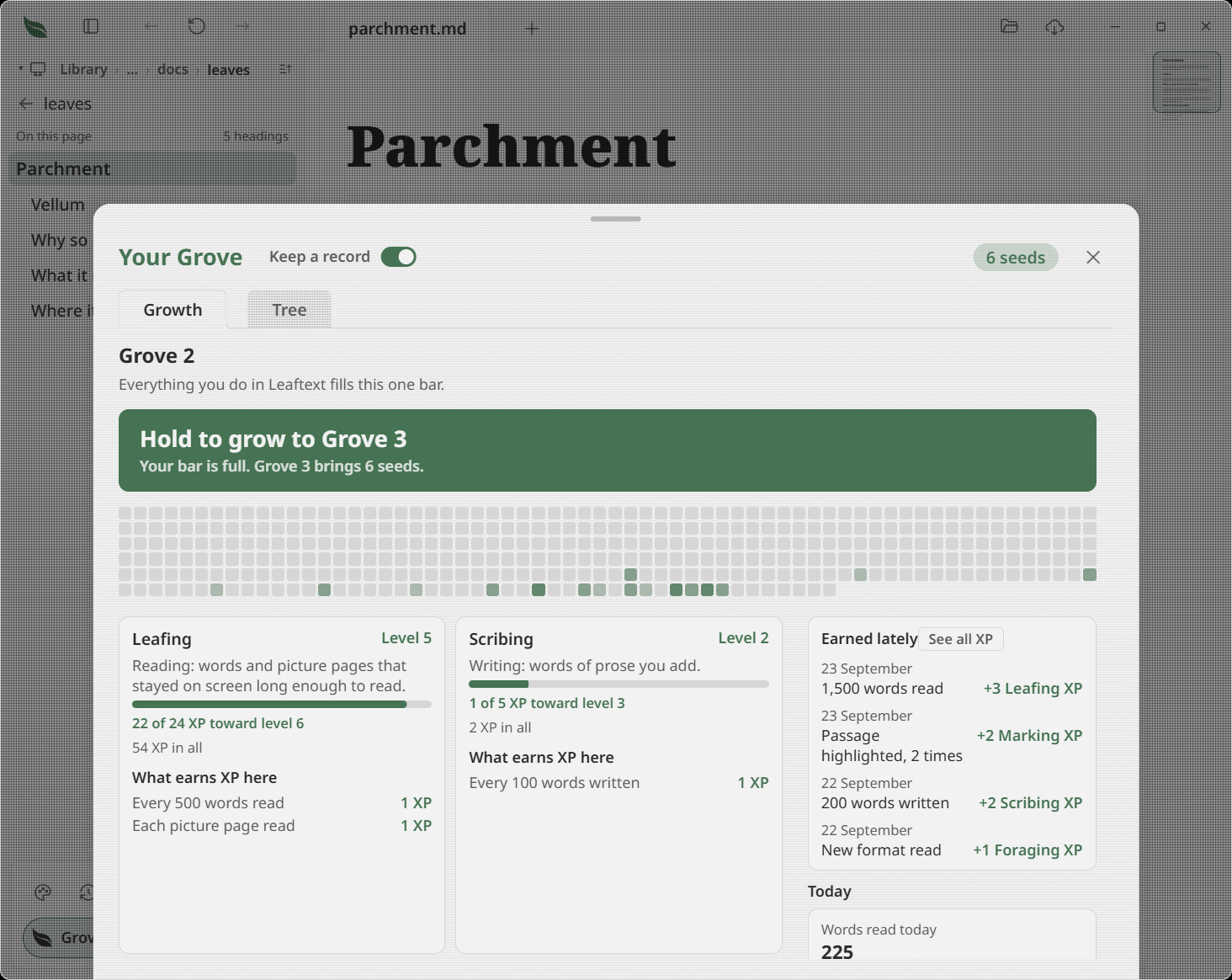
When the library pane is dragged narrow the pill's words shorten and then go, and the leaf stays. When the pane is shut the pill goes with it; open the pane to reach it again.
What it counts
Each area grows from one kind of thing you already do, whether you do it by hand or an agent does it through Leaftext:
| Growth area | What grows it |
|---|---|
| Leafing | Reading documents |
| Scribing | Writing prose |
| Marking | Highlighting passages and hanging notes off them |
| Charting | Drawing flowcharts, including diagrams an agent writes into a note through Leaftext |
| Tabling | Filling in tables |
| Furnishing | Ticking checkboxes, writing fields, placing pictures, and giving a slide its build, once for each slide each time the app is opened |
| Wayfinding | Making links from one note to another, following links, and opening the map and the glossary |
| Seeking | Every search that finds something, and opening what a vault search found |
| Tending | Making and deleting files and folders, renaming and moving files, and setting favorites |
| Rooting | Adding vaults, successfully making or linking repositories, turning automatic sync on for a vault, and pressing Sync when it sends your work; each of these is setup a vault does once, so picking a folder that is already a vault switches to it and pays nothing, a vault pays for its first successful remote link and for its switch once each, a sync with nothing to send earns nothing, and the syncs the switch makes on its own earn nothing |
| Sharing | Exporting a diagram, a picture, a PDF or a page, once for each file written |
| Delving | Looking at a document's source, and standing two documents side by side |
| Foraging | Opening a new kind of file or service page and wearing a new theme |
Every area in the sheet lists every rule that pays it — Every 500 words read, Each picture page read, Each new format read — with the XP each one is worth, so nothing is a guess.
Only what lands pays. Where the app says it could not do what you asked — a note, a highlight, a table cell or words typed into a document whose file has gone, a rename or a paste onto a name already taken, a new file or folder asked for under a name that folder already holds, an export whose save window you closed or whose file could not be written — the bar stays exactly where it was.
Foraging counts each kind of file once: every format, and every source language on its own, so a Rust file, a Python file and a Dockerfile are three finds rather than one. A Google Doc, a Google Sheet and a Google Slides deck opened from a Google Drive vault are a find each as well. It pays nothing for a second file of a kind you have already opened, so it stops where there is nothing left to find — at level 11, for thirty-one kinds of file, three kinds of service page and twenty-one theme families. Under the areas, the kinds of file and service page you have found are lit among the ones still to find.
Seeking counts a search once it has found something and settled: a query you have typed into the find bar that has held at least one match for a second, whether you asked this document or the whole vault. Stepping through the matches, a redraw under the bar and asking the same thing again in the same sitting all pay nothing; another word, another document, or the same word asked of another vault is another search.
Leafing counts the reading you actually reach. A paragraph, heading or other prose block counts once it has been on screen for two seconds, and every 500 words is a point. A sourced picture page in a comic, manga volume or illustrated book is one point after the same two-second dwell; a picture page taller than the window waits until you have reached 90% of it. A table of pictures pays a picture page for every picture standing alone in its cell, so two pictures compared side by side are two points; a picture beside a caption, or a grid of small badges and icons, pays its words instead, and a table of pictures taller than the window pays its pictures out as you move down it. A table of words pays every word in its cells, the same as those words would in a paragraph. A block carrying both substantial prose and a picture pays whichever reading is worth more, never both, so a 500-word illustrated chapter stays a word payment while a picture-led page is a picture-page payment. A block taller than the window — a long table, a long code block — counts by how far down it you have read, so scrolling past the top of one pays for the part you saw rather than all of it. A page Leaftext cannot split into blocks counts by how far down you have read it. Reading the same block or picture page again in one sitting adds nothing, and nothing counts while nobody has scrolled, typed or moved the pointer for five minutes, so a window left open overnight earns nothing. Picture pages never add invented words to Words read today or its landmarks. An area that has not counted anything yet stays at level 1 and says Not started. Every rule pays one point, so one thing you do never reaches more than one level at once. The first unit of anything still reaches level 2, the early levels come quickly, and each level after costs more than the last by a growing amount, so level 50 is months of steady use away. Foraging stops at level 11, because there are only so many kinds of file, service pages and theme families to find. Every bar says the XP it holds and the XP the next level costs; an area at its ceiling says so instead. Seeds come with the Grove's own level: every level the Grove reaches hands the same number of them, whichever areas the XP came from, so reading deep in one area pays exactly what dabbling across many does. They arrive with each Grove level you take, and show at the top right of the sheet.
See XP as it lands
With the Grove shut, whatever pays XP says so on the pill for a few seconds — +1 Leafing — with a thin bar along its foot showing how far that area now is into its level, and pointing at it gives the same words the area's bar says. When one thing you did pays two areas, each takes its turn. Then the pill goes back to your Grove level. Nothing plays when the app opens.
With the Grove open, the same things pop in at the bottom of the sheet instead and rise over it — 500 words read or Picture page read, then +1 Leafing XP — each standing a couple of seconds and fading, up to three at a time, while the area's own card fills and its level rolls over to the new one and the Grove bar takes the same XP. Anything that pays while the All XP list is up waits there and rises when you come back, joined into one line where the same thing paid more than once. With Reduce Motion on, the words simply appear and go, and the levels change with no roll.
The Grove sheet's column beside the areas opens on Earned lately: the latest things that paid, newest first, each with its day, what you did — 1,000 words read, Picture page read, 3 times, Vault synced, 3 times — and the XP it was worth. The same kind of payment on the same day adds up on one line, and the list keeps the twelve latest. It starts empty and fills from the next thing that pays.
See all XP, on that heading, opens the whole account in place of the sheet's body: every gain Leaftext has ever kept, newest first, under the day it happened on, each with the time on your own clock, what you did, the level and the Grove pool it moved, and what it was worth. A Grove level you took is a line too, with the seeds it brought. Show older brings the next couple of hundred; the back arrow and Escape return to your Grove. Gains are kept in growth-log.jsonl beside the record, and nothing earned before this list existed is in it — nothing saved those with a time.
Under it, Today says what today has come to so far — the words read and the documents opened, each document counted once a day however often you open it or restart Leaftext — directly above the Landmarks for the most of each in a day, so you can see whether today is about to beat them. It counts from midnight on your own clock, and stays hidden until today has something on it.
The record holds counts, and the ids of the things that pay only once — which kinds of file and service page you have read, which theme families you have worn, which vaults you have linked to a repository, which vaults you have set to sync themselves. Never a file's name, its folder, or a word of what it says.
Grow the whole Grove
A Growth area's level is never asked for: its bar fills as you use Leaftext and the card rolls over to the new level where you can see it. The Grove's own level is the one thing you take, and it is the only hold in the app.
When the Grove's bar fills, the thin bar is replaced by one press the width of it, reading Hold to grow to Grove 3 over a line saying the bar is full and how many seeds that level brings. Where the bar has filled more than once, the press names the level it lands on and says how many times it filled and every seed the run brings — Hold to grow to Grove 7 over Your bar filled 3 times. Grove 5 to 7 brings 18 seeds. Press and hold it until the fill crosses it, and every level it names is yours: the press bursts into confetti and the Grove number rolls up through all of them with every seed they brought. Let go before the fill is across and nothing is sent. Pressing it once from a screen reader takes it at once, and with Reduce Motion on the numbers simply change. XP you earned past the level stays in the bar toward the next one. Closing the sheet keeps the level waiting, and XP keeps being counted behind it. While the bar is full the same press also stands at the top of the Tree tab, above the tree, so a level a reward is waiting on can be taken where the seeds are spent; with the bar not full the Tree tab shows no press.
Grow with seeds
Everything you can grow sits in one tree, on the Grove sheet's Tree tab beside Growth, so reaching it never means scrolling past the bars. The sheet opens on whichever of the two you last looked at. The tree climbs from a strip of soil up a trunk in nine bands of Grove levels — Grove 2–7 at the foot, then Grove 8–13 and so on up to the last, which runs from Grove 50 to the Grove's ceiling — and each band's label sits on the trunk. The trunk fills from the soil to your own Grove level, and your band's label is filled with it. Each reward is a round button with its name under it, standing straight above the reward it grows from: Woad, Lavender and Iridescent skin climb one line. Where a window is too narrow for the names, each band draws its rewards as a row of smaller circles with no words under them, never wider than their place and never touching, and the names come back as the window widens. The tree scrolls up and down only, opens with your own band in view, and your seeds stay one number at the top right.
Solid branches connect rewards to their prerequisites, meeting the circles above their names. Each branch has its own route; a small break where unrelated branches cross shows that they do not join. Lighter dotted branches connect independent rewards to the trunk. The tree leaves room for those routes as the window narrows.
At rest the two kinds of line color for different reasons, and the tree's heading says so: a dotted branch colors once your Grove reaches its band, and a solid one colors once you own the rank of the earlier reward it asks for. Neither says the reward it leads to can be grown yet. Point at a reward and its own lines stand out — the one it grows from, the ones that grow from it, and its dotted branch to the trunk if it has one — while every other line steps back. The circles at the other ends of those lines get a light ring, and a small open circle marks each place a traced line meets a circle. Move away and the tree goes back to rest. Tab to a reward and the keyboard traces it the same way; pointing at another reward wins while the pointer is there. Tracing chooses nothing and spends nothing.
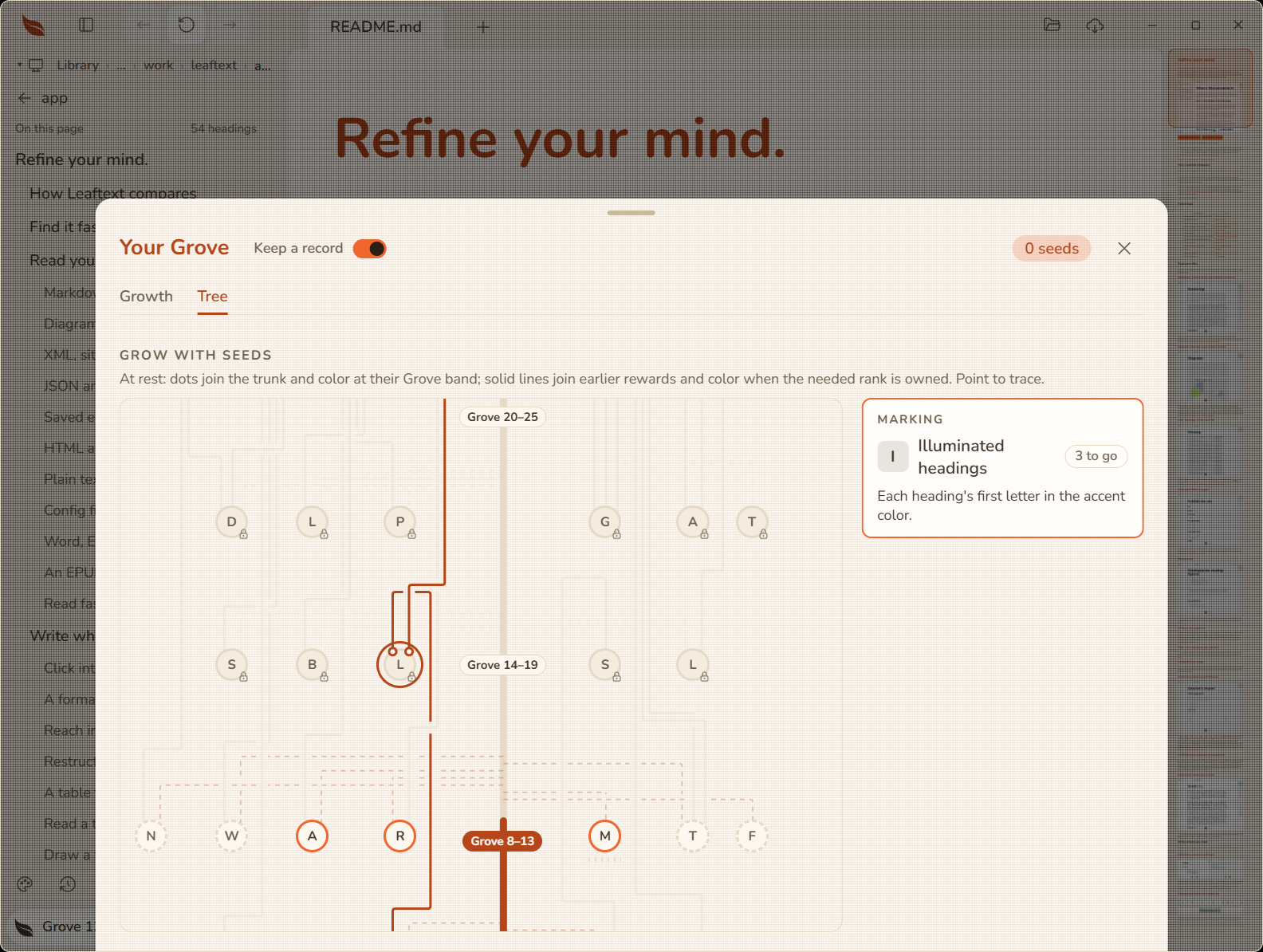
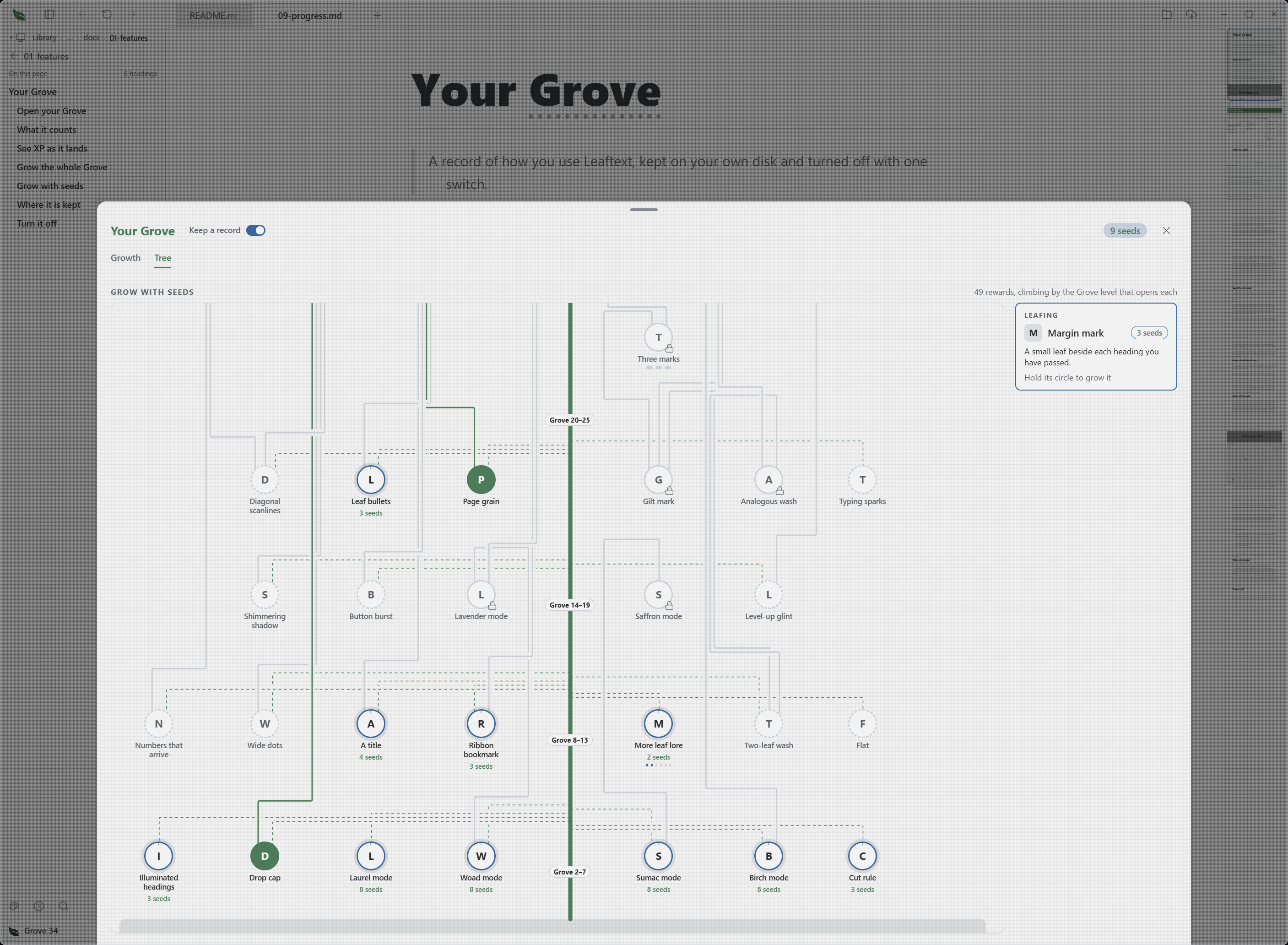
Click a reward's circle and it is drawn whole in the card beside the tree — the Growth area it belongs to, its name, what it does, and everything you can do with it. Until you click one, the card shows the first reward from the soil up that you can grow. On a narrow window the card stands over the tree instead.
Growing anything asks three things of you: that your Grove has reached the level written on that reward, that you already own every earlier reward it names, and that you hold the seeds for it. The XP can come from any area — a reward written under Leafing opens just as well on a Grove level you reached by drawing flowcharts. A reward you cannot grow yet wears a small lock, and its card says what is still in the way — Needs Grove 22 first, then the earlier rewards. A reward Leaftext has not built yet stands in a dashed ring reading Not grown yet instead, with no lock and no level, because no Grove level or earlier reward opens it. The stem joining it to an earlier reward colors once you own that one, and a reward that grows from nothing hangs off a branch of the trunk that colors once your Grove reaches its band. A few things can be grown more than once, and each of those times waits for a Grove level of its own further up the climb. Something another part of Leaftext has not built yet stands on its path in a dashed ring, and its card says Not grown yet.
Hold an affordable reward's circle until its ring fills to grow it or its next rank. Let go early to see its card without spending. When the purchase is taken, confetti bursts from the circle and your seed balance rolls down to its new number. A screen reader can activate a circle once to hear its card and again to grow it. Seeds you spend are not given back, and nothing you grow is ever taken away — the one exception is a reward Leaftext retires, which goes from the tree and hands its own price back to everyone who had grown it.
Topping out the Grove pays enough seeds to buy every rank of everything that has grown.
What you can grow today:
- Six one-color themes, Foraging's — Woad, Sumac, Laurel, Saffron, Lavender and Birch. Each stands dimmed and priced in the theme picker until you grow it, and pressing it there opens its card here; a theme you grow is worn from the picker and joins Random; press Wear it in Themes in its card to open the picker there.
- Things on the page — a drop cap on the document's first words, a leaf-cut divider, the chrome's speckle on the page itself, leaf bullets, headings whose first letter takes the theme's color, a small leaf beside each heading you have read, and the theme's accent on the ribbon bookmark every reader has on the minimap. Each arrives switched on and has its own switch in its card.
- More leaf lore — six more sentences for the start screen's palm-leaf voice, one each time. From the first sentence its card has a switch that takes every sentence you bought off the start screen and brings them back, while the next one stays for sale.
- A title — Reader, Scribe, Cartographer or Prism Keeper, shown under Your Grove. Its card has a switch that hides the name and shows it again; you can still pick a different name while it is hidden.
Hiding a reward keeps it: what you paid, its ranks and the name you chose all stay, and the Grove goes on counting.
A reward you grew before the tree was ordered by Grove level stays yours, whatever level now opens it.
Where it is kept
The record is profile.json, beside settings.json and recent-files.json in Leaftext's settings folder — %APPDATA%\ryanallen\leaftext\config on Windows and ~/Library/Application Support/com.ryanallen.leaftext on a Mac. Leaftext writes it about half a minute after something changes, and once more when you close the window. If the file is missing or cannot be read, Leaftext starts a fresh record and opens as normal. A record kept by a copy of Leaftext from before the Grove had a bar of its own is started fresh once, the first time a newer copy opens it, because its numbers were counted the old way.
Every gain is kept a second time in growth-log.jsonl, beside the record: one line per thing you did, with the time it happened, the levels and the Grove pool it moved, and what it was worth. It is what See all XP reads, it is appended to rather than rewritten, and once it passes 3 MB the next launch trims it back to its newest 20,000 lines. Reset all empties it; Reset all but stats keeps it.
Turn it off
Open your Grove and press Keep a record in the sheet's header. With the record off nothing is counted, no bar moves, no level is earned, the pill reads Grove with no number, and the sheet holds only the switch and a line saying so. Everything you have grown on the page, the title and the extra lore go away while it is off, and a theme you are wearing stays on. Press the switch again to start counting where you left off, with everything you grew back as it was.
The published site and a document embedded in another product keep no record, and show no pill.