Meet Leaftext
Refine your mind. Your thoughts, secure and free — a free desktop app for reading and writing your own documents, on your own machine.
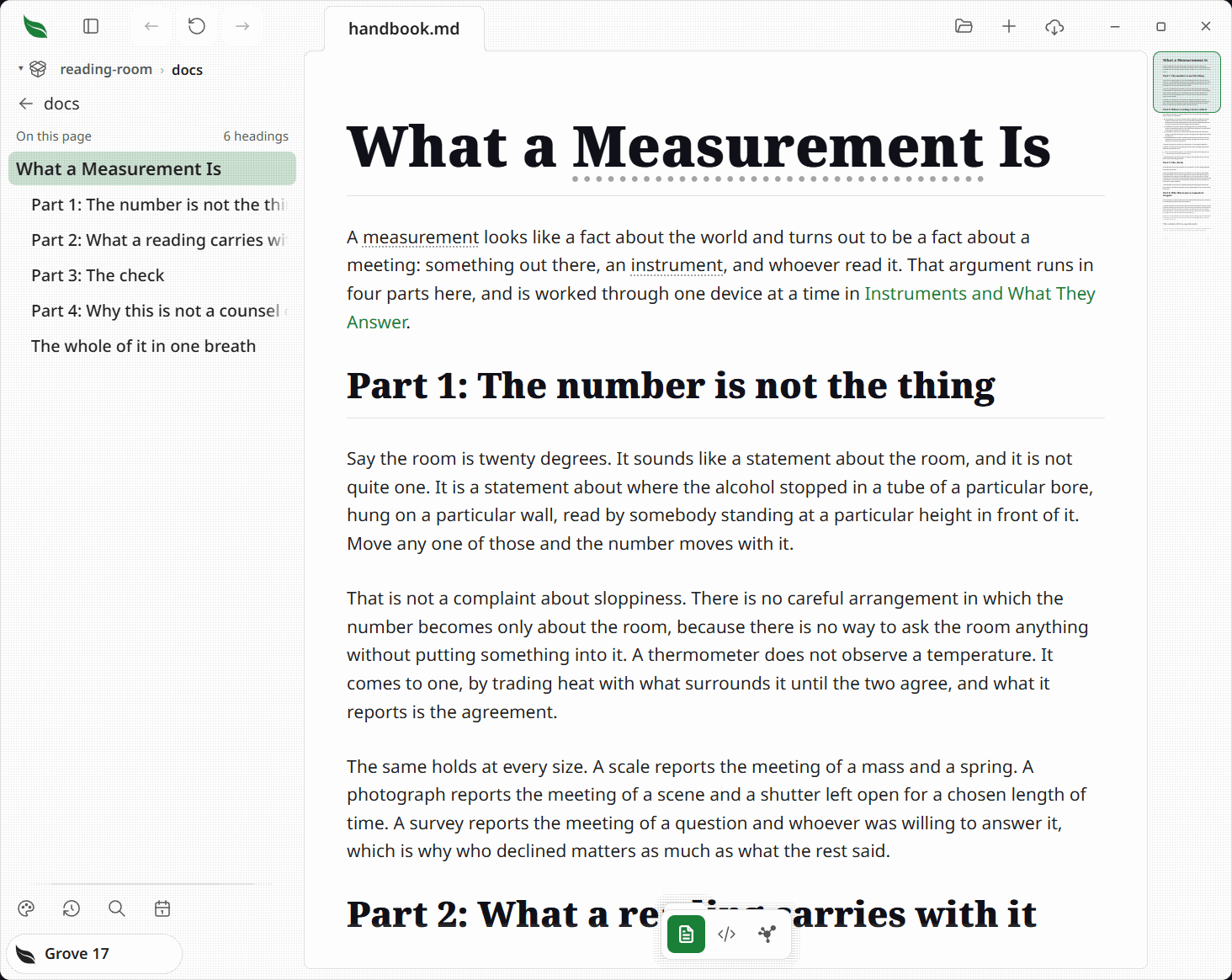
Leaftext turns the files you already have into pages you actually want to read. Open a Markdown, HTML, XML, JSON, or YAML document — a plain text or config file, a CSV table, a source file, or a saved email — on macOS or Windows and it renders clean and calm. Keep your place with tabs, history, a minimap, and a searchable library. When something needs changing, click into the sentence and type — or drop to the raw source in the code view — then save when you're ready.
Your thoughts stay yours. No account, no cloud, no telemetry. Your documents never leave your device, and they stay plain Markdown, HTML, XML, JSON, YAML, text, config, source, and email files — and Word, Excel, PowerPoint, OpenDocument and EPUB files that Office, its rivals and every other reader open unchanged — so any other app can read them, so you're never locked in.
New to the terms? Words like minimap and frontmatter link into the glossary — clicking one opens its entry in a bottom sheet over this page instead of taking you away from it. The glossary carries one entry per feature and subfeature, so it doubles as an index of the whole app.
Where to go
| You want to... | Start here |
|---|---|
| Install the app | Installation |
| Get past the Mac first-launch block | Mac blocks the first launch |
| Open your first file | Quickstart |
| Check rendering support | Rendering |
| Learn the keyboard shortcuts | Navigation → Shortcuts |
| Search your notes | Library → Search |
| Write in the page | Editing |
| Change the look | Themes |
| Look a word up | Glossary |
| Connect your AI agent | Your own AI agent in Leaftext |
| See it beside Obsidian, Typora and Calibre | How it compares |
What you can do
Read
- Read Markdown as GitHub renders it — CommonMark and GFM, highlighted code, diagrams, math, callouts, footnotes, emoji, and your own images.
- Read XML without opening an editor — sitemaps, feeds, and config files as readable pages, TEI documents as editions.
- Read JSON and YAML as pages too — a lock file, a CI workflow, or a Kubernetes manifest as headed sections, aligned fields, and record tables instead of punctuation.
- Turn a Markdown table into a relational table: cards, a board, a list, filters, sorting and links to rows in other files, with the plain table still your file.
- Open a saved email (
.emlfrom Gmail, Outlook, or Apple Mail) as the message it carries — headers, body, inline images, and attachments — instead of a wall of base64. - Open a Word, Excel, PowerPoint or OpenDocument file (
.docx,.docm,.xlsx,.xlsm,.pptx,.pptm,.odt,.ods,.odp) as the document it is — headings, paragraphs, lists and tables, a sheet as a table of records, a deck as its slides with every box where the file puts it and its speaker notes underneath — and type into it in place, with everything Leaftext never read kept byte for byte on save. - Open an EPUB book (
.epub) as one document in the order its own package says to read it, with its contents page, its links and its pictures all inside the book and nothing fetched from the network. Type into a chapter and Save writes only the chapters you changed. - Open a Kindle book (
.azw,.mobi,.azw3) that carries no protection as one document, and browse the Kindle app's own folder by title, author and kind of file. - Turn on Speed Reader to dim the page back and mark each word's start, so your eye follows the reading path down.
Move around
- Keep several documents open at once in tabs.
- Open a live web page in a web tab beside your documents: type an address or a search into a new tab.
- Jump to any section from the outline in the pane beside the document, or from the minimap rail on its other side.
- Move back and forward through documents and in-page jumps, like a browser.
- Read a folder in order with the pager at the foot of each page.
- Hover a link for a hint saying what kind it is, where it goes, and how long that document is — and over a glossary term, the entry itself, so the word is read without leaving the sentence.
- Define a word once in a glossary and every mention of it, in every document, opens the entry in a sheet over the page.
- Edit a file in another app and Leaftext picks up the change without losing your place.
Find
- Point Leaftext at a folder to make it a vault — the unit search, syncing, and the graph work over.
- Browse it a folder at a time in the library pane, with a breadcrumb that always says where you are.
- Search names and contents across the vault, with snippets. No index on disk, and nothing uploaded.
- Press a tag to find its notes and nested tags; rename it across the vault after confirming the file count.
- See how it all connects in the graph view — documents, the links between them, and the web addresses they cite.
- Push a vault to GitHub with sync, using the
gitalready on your machine.
Write
- Write where you read: click into a sentence and type, split and merge blocks with
EnterandBackspace, tick checkboxes, and undo and redo step by step. - Restructure without leaving the page: drag a block by its handle in the margin, add one on the empty line below, and highlight words for a format bar, whose copy, highlight and annotate buttons work on a locked document as well.
- Draw a flowchart instead of typing one in the flowchart editor — a canvas beside the Mermaid text, both kept in step — open any diagram already in a page the same way, and export one as its own Markdown file or picture from its own corner, with the padlock shut.
- Switch any document to its raw source in the code view — highlighted, line-numbered, editable — and save only when you say so.
- Get typing help while you write there: Monaco's IntelliSense, answered from your own notes —
[[completes a note name,#a heading, and a broken link is underlined. - Start from nothing with the + in the app bar: a new document opens ready to type, and its first save is where you choose the file.
Make it yours
- Pick one of thirteen themes, with six more to earn in the Grove, each in light and dark, plus System and Daylight. See them all first at leaftext.com/gallery.html — every theme, color, icon and part of the interface on one page, with a switcher for the family and for light or dark.
- Everything moves together — text, code, callouts, diagrams, minimap — because every theme fills the same token contract.
- Choose the theme, Speed Reader, typing help, and padlocks; each choice saves to a JSON file you can read.
Layout
flowchart LR
    A[Open Markdown, HTML, XML, JSON, YAML, text, config, source, email, Word, Excel, PowerPoint, OpenDocument or EPUB file] --> B[Rendered reading view]
    B --> C[Minimap]
    B --> D[Tabs]
    B --> E[Back / Forward history]
    B --> F[Library pane]
    B --> G[Code view]
    B --> H[Graph view]
Example
# Release Notes

> [!TIP]
> Drag this file into Leaftext.

- [x] Ship docs refresh
- [ ] Review screenshots

```ts
console.log("Hello from Leaftext");
```
That file opens as a formatted document, not as source code in an editor.
Next
- Installation if you have not got it yet.
- Quickstart shows the actual reading flow.
- Rendering shows what Markdown syntax, XML structure, JSON/YAML shapes, and email files the app renders.
- How it compares sets it beside Obsidian, Typora and Calibre, and says how it works beside AI.
- Library explains vaults, search, the graph, GitHub sync, and storage service vaults.